What is a basketball scoreboard and how does it work? A basketball scoreboard is an electronic display that shows vital game information like the score, time remaining in quarters or halves, fouls, and possession. Understanding how to operate one is crucial for smooth game flow, whether you’re a scorekeeper, referee, or coach. This guide will walk you through the ins and outs of basketball scoreboard operation, ensuring you can effectively manage the game’s essential data.
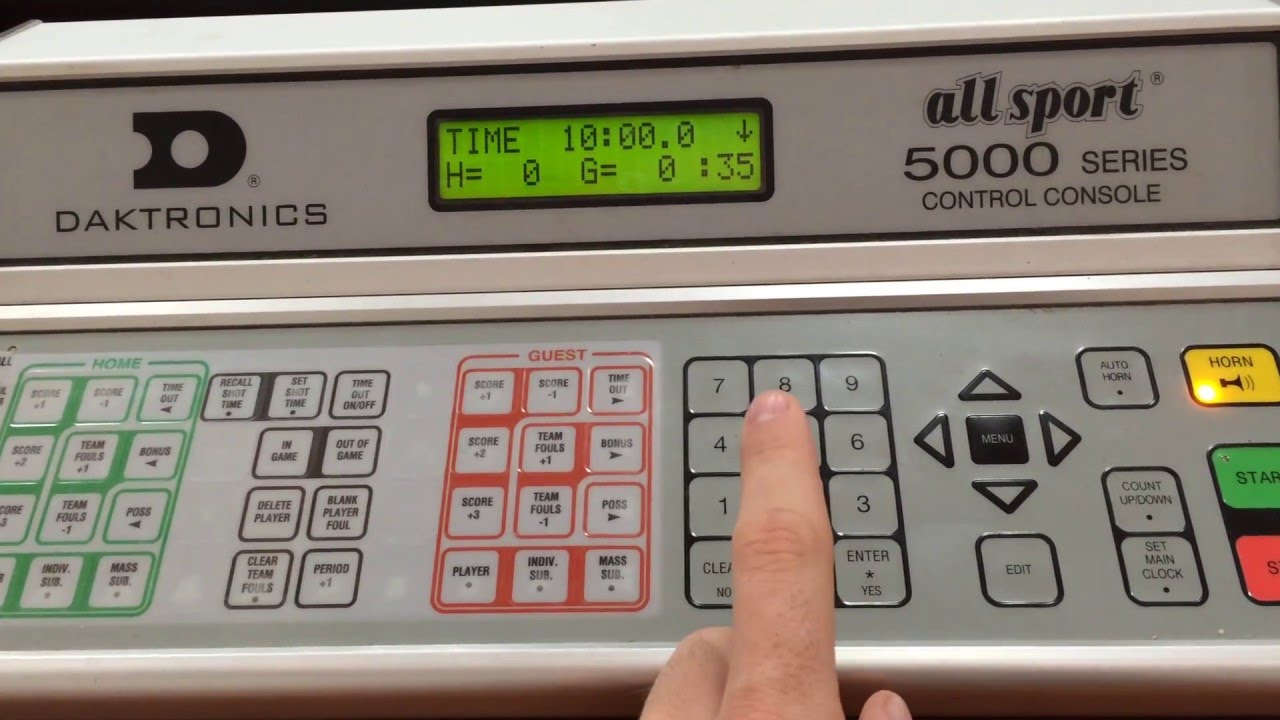
Image Source: i.ytimg.com
Getting Started: Scoreboard Setup for Basketball
Setting up a basketball scoreboard correctly is the first step to a well-managed game. This involves ensuring the scoreboard is powered on and properly connected, if it’s not a self-contained unit. For larger venues, this might mean checking connections to a central control panel.
Powering On and Basic Checks
Most electronic basketball scoreboards have a clear power button. Locate it and press it to turn the unit on. A quick visual check to confirm all segments of the display are illuminated and that there are no error messages is essential. If the scoreboard is battery-operated, ensure the batteries are fresh and correctly installed. For plugged-in units, verify the power cord is securely connected to both the scoreboard and a working outlet.
Connecting Control Panels
Many advanced scoreboards use a separate control panel or console. This panel is the brain of the operation, allowing the scorekeeper to input all game data. Ensure the cable connecting the scoreboard to the control panel is securely plugged in at both ends. Some wireless systems may require pairing the control panel with the scoreboard. Consult the specific model’s manual for detailed instructions on connection and pairing.
Deciphering the Basketball Score Display
A basketball score display is packed with information. Knowing what each section represents is key to effective scorekeeping basketball.
Key Elements of a Scoreboard Display
- Team Scores: Typically the largest numbers, showing the current points for each team.
- Game Clock/Timer: This shows the remaining time in the current period or half. It counts down, and when it reaches zero, a buzzer or horn usually sounds.
- Period/Quarter Indicator: Displays which quarter or period of the game is currently being played (e.g., 1, 2, 3, 4).
- Possession Indicator: Often a small arrow or light that shows which team has the ball.
- Team Fouls: Indicates the total number of fouls committed by each team. Once a team reaches a certain foul limit (often five), the opposing team may get bonus free throws on subsequent fouls.
- Player Fouls (Less Common on Main Display): Some advanced electronic basketball scoreboards might also show individual player foul counts, though this is often handled on a separate smaller display or by the scorekeeper manually.
- Timeout Indicators: Shows how many timeouts each team has remaining.
Mastering Basketball Game Timing
Accurate basketball game timing is vital for maintaining the pace and fairness of the game. The scoreboard’s clock is central to this.
Starting, Stopping, and Resetting the Clock
- Starting the Clock: The game clock starts when a player legally touches the ball after a throw-in or when the ball is put into play from a dead ball situation. The scorekeeper typically starts the clock using a button on the control panel.
- Stopping the Clock: The clock stops for whistles (fouls, violations), out-of-bounds plays, timeouts, and when a team scores. These actions require the scorekeeper to stop the clock promptly.
- Resetting the Clock: At the beginning of each quarter or half, the clock is reset to the designated game time. It is also reset if there is a special circumstance requiring a restart of play.
Understanding Game Periods and Overtime
Basketball games are divided into periods (quarters) or halves. The clock is reset at the start of each period. If a game is tied at the end of regulation, overtime periods are played, with the clock starting and stopping as during regular play. The scorekeeper must be attentive to when a period ends and be ready to reset the clock for the next one.
Scorekeeping Basketball: The Scorekeeper’s Role
The scorekeeper is the guardian of the game’s statistics. Their role goes beyond just updating the score.
Basic Scorekeeping Responsibilities
- Updating Scores: Accurately recording points scored by each team after every successful basket.
- Tracking Time: Managing the game clock and ensuring it starts and stops correctly.
- Recording Fouls: Logging personal fouls committed by players and team fouls.
- Monitoring Timeouts: Keeping track of timeouts used by each team.
- Indicating Possession: Using the possession indicator to show which team has the ball.
Advanced Scorekeeping: Player Statistics
More comprehensive scorekeeping includes tracking individual player statistics like points, rebounds, assists, steals, and blocked shots. This requires a good understanding of basketball scoring rules and often involves using dedicated scorekeeping software or apps in conjunction with the scoreboard.
Using a Basketball Scoreboard: Practical Steps
Let’s delve into the practical aspects of using a basketball scoreboard for different scenarios.
Setting the Initial Game Time
Before the game starts, the control panel needs to be set to the correct game duration for each period. This is usually found in the league’s or tournament’s rulebook. For example, a high school game might have 8-minute quarters, while a professional game has 12-minute quarters.
Inputting Scores
- Adding Points: When a team scores, the scorekeeper uses the control panel to add the appropriate points (2 for a regular basket, 3 for a three-pointer, 1 for a free throw).
- Correcting Errors: If a score is entered incorrectly, most control panels have a function to subtract points or edit the current score. It’s crucial to make these corrections quickly and clearly.
Managing Fouls and Timeouts
- Foul Input: When a foul is called, the scorekeeper identifies the player and the team, then inputs the foul into the system. The scoreboard will reflect the updated team foul count.
- Timeout Input: When a team calls a timeout, the scorekeeper activates the timeout function on the control panel, and the scoreboard will typically display the remaining timeouts for that team.
Interpreting Basketball Scoring Rules
Knowing basketball scoring rules is fundamental for accurate scorekeeping. The scoreboard is a tool that reflects these rules.
Standard Scoring Values
- Field Goal: 2 points are awarded for a shot made from inside the three-point line.
- Three-Point Field Goal: 3 points are awarded for a shot made from beyond the three-point line.
- Free Throw: 1 point is awarded for each successful free throw shot.
Special Situations Affecting the Scoreboard
- Technical Fouls: Usually result in free throws and possession. The scorekeeper must accurately add the free throw points.
- Flagrant Fouls: Similar to technical fouls, with penalties including free throws and possession.
- Intentional Fouls: Penalties may vary depending on the league, but typically involve free throws.
- Goaltending/Basket Interference: If a defensive player interferes with the ball on its downward trajectory to the basket or while it’s on or within the cylinder of the basket, the points are awarded to the offensive team, even if the ball doesn’t go in. The scorekeeper adds the points as if it were a made basket.
Advanced Scoreboard Features and Operation
Modern electronic basketball scoreboards offer more than just basic scoring and timing.
Possession Arrow and Shot Clock
Many scoreboards incorporate a shot clock, which is a separate timer that limits the offensive team to a certain amount of time (usually 24 seconds) to attempt a shot. The possession arrow is a visual cue to indicate which team has the right to possess the ball.
- Shot Clock Operation: The shot clock starts when a team gains possession of the ball. It resets to the designated time after a shot hits the rim. If a violation occurs, the opposing team gains possession.
- Possession Arrow Use: The scorekeeper flips the arrow to indicate which team is currently on offense. This is essential for preventing violations and ensuring fair play.
Buzzer and Horn Functionality
The scoreboard is usually integrated with a buzzer or horn that signals the end of a period or a shot-clock violation. The scorekeeper operates this through the control panel.
How to Read a Basketball Scoreboard: A Quick Guide
For spectators and players alike, knowing how to read a basketball scoreboard is simple once you know the key elements.
- Scores: Look for the two prominent numbers, usually on the left and right, indicating the points for each team.
- Clock: The central, larger numbers show the time remaining in the current period.
- Period: A smaller indicator, often near the clock, shows the current quarter (e.g., Q1, Q2, or just 1, 2, 3, 4).
- Fouls: Look for smaller numbers, often near the team names or scores, representing the team foul count.
- Possession: A small arrow or light will point to the team currently in possession of the ball.
Troubleshooting Common Scoreboard Issues
Even with proper setup, scoreboards can sometimes encounter problems.
Display Errors
If segments of the display are not lighting up correctly, it could be a loose connection or a faulty bulb/LED. Try power cycling the unit (turn it off, wait a few seconds, then turn it back on).
Incorrect Time or Score
Double-check that the correct buttons were pressed on the control panel. If a time or score is consistently wrong, the control panel or the scoreboard itself might need servicing.
Buzzer Not Sounding
Ensure the buzzer function is enabled in the settings and that the volume is turned up. Check for any visible obstructions around the buzzer.
Frequently Asked Questions (FAQ)
Q1: How long is a basketball game according to the scoreboard?
A1: The length of each period is set on the scoreboard by the scorekeeper based on league rules. Common quarter lengths include 8 minutes (high school) and 12 minutes (professional).
Q2: Can I use a scoreboard without a separate control panel?
A2: Some simpler or older scoreboards might have controls directly on the unit. However, most modern electronic basketball scoreboards rely on a separate control panel for comprehensive operation.
Q3: What happens if the scoreboard malfunctions during a game?
A3: If the scoreboard malfunctions, especially the clock, the referees will typically revert to manual timing using a stopwatch. The scorekeeper will still aim to track fouls and other data manually.
Q4: Who is responsible for operating the scoreboard?
A4: The scorekeeper, typically designated by the home team or league officials, is responsible for operating the scoreboard and all related scorekeeping duties.
Q5: How do I reset the scoreboard for a new game?
A5: After a game concludes, the scorekeeper will clear all previous data, reset scores to zero, and set the clock and period indicators to their starting values for the next game.
By familiarizing yourself with these aspects of basketball scoreboard operation, you can contribute to a well-organized and enjoyable basketball experience for everyone involved. From the initial setup to the final buzzer, a functioning and correctly operated scoreboard is a silent yet essential partner in the game.